The Doc needs Starlink for The Kimberley trip in 2026 – many bookings can only be made online and with poor mobile coverage, so Starlink will be his only option. How things have changed since his last trip there.
The Doc bought the Smart Touring Systems Starlink MIni Mount bracket (key lockable) here. It was an easy install, less than 5 minutes. It was mounted onto the Rhino Pioneer Platform using four M8 bolts with Nord-Lock washers, torqued to 16Nm.
The Doc is waiting for some narrow split tubing so he can protect the Starlink cable and it will be plugged into a rooftop outlet (front passenger side outlet).
The Doc will also have the option to run a power cable from my 125Ah Lithium Battery Box if the power drain is too much when camping. He can also plug it into the Vista RV van. Viva Cristo Rey:\.
The Doc installed the iCheckTPMS sensors to test (car only). He is testing it before upcoming trips. It allows him to monitor the car’s spare tyre and also the tyres on the Vista RV Crossover van, including the van’s spare. It monitors tyre pressure and tyre temperatures.
It worked straight away. No hassles.
The Doc may also add in the van hub temp sensors. You just need to buy the hub sensors.
The Doc will be using the system when he goes on The Kimberley later in 2026. Anytime The Doc changes the tyres up and down, the benchmark pressure on the sensor resets and allows 25% PSI increase before the alarm sounds, or 15% down. The Doc wishes the IG TPMS system worked the same way!
The Doc will ignore the IG tyre sensors when he needs to often change pressures on the trip across bitumen, gravel, sand and corrugations.
This video show you how easy it is to set up and use, plus its features. It is an all wireless setup. The Doc bought an 8 sensor kit. Viva Cristo Rey:
In preparation for the Kimberley trip (hopefully) later this year.
Working from the right side of the GrenX Rail, The Doc a GME UHF Mic holder on the angle side. He can move the UHF hand-piece across from the passenger side holder, when offroad.
The Doc dissembled the GME Mic Holder (Model MB207), drilled a hole in the back plate, inserted a stainless steel 1/4 inch 20 UNC bolt through the hole, reassembled the Mic holder. He put double sided tape on the back and then screwed the ¼ inch 20UNC bolt into the GrenX Rail. The allen key was inserted through the opening in the GME Mic Holder. The idea was from Rohan at @GrenX. The Doc did buy 1/2 20UNC bolts but they did not fit into the Mic Mount. The 1/4 bolts fitted perfectly.
Next is the Garmin GPS Tracker.
Far left is the holder for the caravan reversing camera screen, not currently mounted. This reversing camera and the Garmin use RAM Mounts.
Pictures below show the Mic piece moved from the passenger side holder to driver’s side holder.
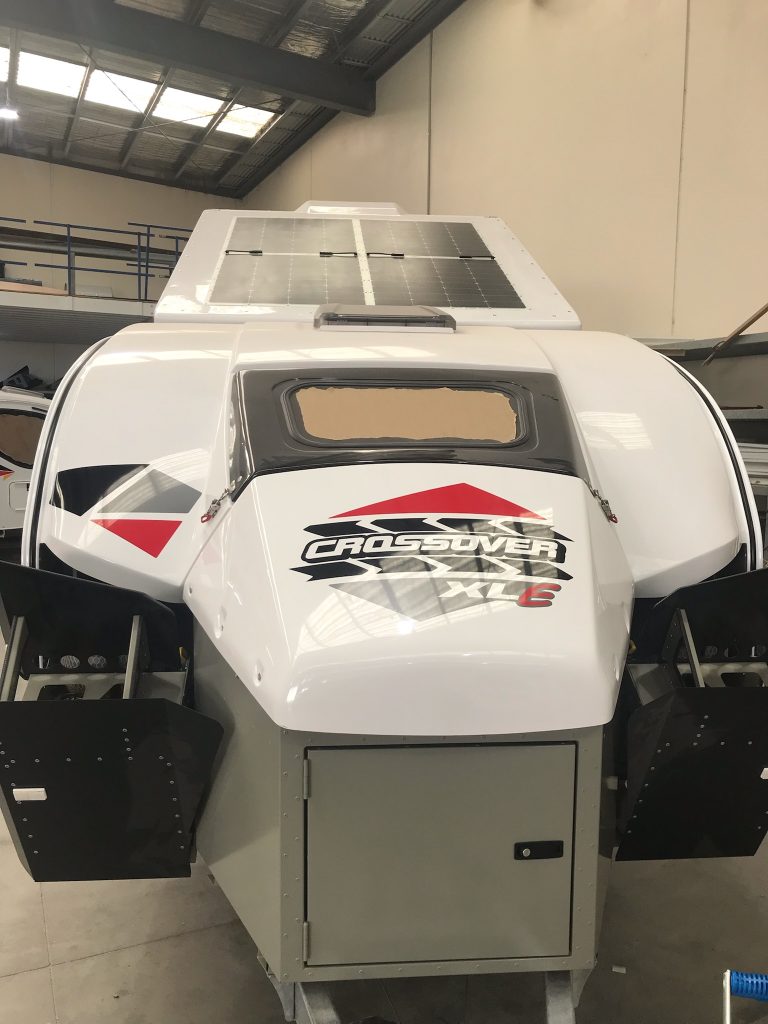
The Doc’s new hybrid offroad caravan is nearly ready – just a shelf to be made and installed. Photos were supplied today of the van.
Electrics controlled by a REDARC TVMS with the REDARC Rogue added on for more circuits. 645W of solar panels, 400Ah of Lithium batteries and a 3000W REDARC Black Alpha inverter. It has the air suspension option as well. Tyres match the Grenadier, BF Goodridge KO2’s. Plus red go fast stickers. External kitchen with a small internal kitchen. Fridge can be used internally and externally (it is on draw).
The model name XLE signifies external fridge, verse XLI for internal fridge.
The Doc will install his JOOCLA Shower into the van.
STEDI Hex brackets (choose size 48 to 53mm). The STEDI hex bracket came with a Torx Security key to tighten the bolts in the hex bracket. Not sure of the size because I could not get my Torx Security bits to fit properly. The brackets come with three M6 bolts of different sizes and types. One pair was the correct length to use in my setup. The Doc also used a Nord Lock washer and a flat washer on the M6 bolt. The Nord Lock washer ensures corrugations do not loosen the bolts.
Two standard M6 nuts. Only a standard M6 nut fitted into the hex bracket slot, a M6 Nylon Lock Nut was too thick. The hex bracket only came with Nylon Lock Nuts. See also point 1 below under FITTING.
Relay, tools and wiring.
The Viper had a 2 pin Deutsch DT plug attached and a wiring loom. The power came from the Grenadier’s 10 amp wire ends under the bonnet. The auto electrician changed the loom and added a relay and integrated it into the car. The Doc never saw the modified loom. The relay turns on the lights when it senses current to the high beam on your spotlights (which only work when the highbeams are on).
Laws in News South Wales and WA require lightbars to be fitted to the underside of the Roo Bar hoop, not above it. You have much more flexibility if you can mount it above the Roo Boo, but at increased risk to pedestrians.
FITTING
Affix with the Lightforce slide mounts that attach to the rear of the lightbar (not the ends which use brackets – the Ligthtforce comes with both options supplied) You need to reverse the way the bolts normally insert into the hex bracket. You may need to trim the bolt’s length so it does not protrude pass the width of the bracket onto the Roo Bar. Adding two washers on the M6 bolt was enough so the bolt did not protrude, in my case. The Doc used a Nord Locker washer, flat washer and a standard M6 nut.
Affix the slide brackets to the bottom half of both hex brackets. The nut must go inside the hex bracket slot, not the bolt head as normal. The image below of the slide bracket shows the correct orientation for inserting the bolt into the hex bracket.
Attach the slide brackets to the lightbar. Tighten bolts onto the slide brackets, after spacing them correctly (The Doc placed then 100mm in from each end of the lightbar). Just hand tighten the bolts and check the angle of the lightbar fitted under the Roo Bar, adjust position of slide brackets if needed. You do have some additional adjustment with the way you affix the hex bracket to the Roo Bar.
Attach hex brackets to the Roo Bar, check it is centered correctly. Tighten all 8 bolts in the hex brackets. TIP: when tightening the Torx Security bolts on the hex bracket, The Doc would tighten a bolt two turns and then go around and do the same to all the bolts. If you tighten one bolt too much, it can result in another becoming loose. The described approach minimised that effect.
Wire up the lightbar or call ORS (Sydney based) and have then do it for you.
The Single Row Viper Lightbar lines up nicely with the grille cross support to minimise disruption to the air flow.
ANOTHER OPTION: If you do not have a winch, fitting the 20-inch Viper down on the bumper would be another option. Or if you do have a winch, be very careful about drilling holes in the bumper. The end brackets could be used for mounting in this position.
20-inch Lighftforce Viper LED lightbar installed today. Images below, the pictures were taken after the lightbar was attached, but it was not wired up and the blue protective film was still over the lens. A detailed install guide will be posted.
The Doc has been working on a little project for a few weeks now. He finds out tomorrow whether it will work.
He was going to install a 10-inch low profile LED Lightbar under the top loop of the Roo Bar (in NSW it is illegal to mount then above the Roo Bar – even though people do it).
After some research his is now trying to mount a 20-inch lightbar there instead– it will either just fit or not fit. It is so close we need to do an actual test fit.
He needed low profile mounting brackets, which he now has and has done a test bracket fitting. The Doc had worked out 3 ways to mount the 20-inch lightbar to the bracket, but after the test fitting 2 of those ways will not work. All 3 should work with a 10-inch lightbar. Power will come from the 10 amp bonnet circuit, with some other wiring.
The Doc did not want my mounting brackets or lightbar to be an additional pedestrian risk, so everything must be behind or inline with the Roo Bar. When mounted, the Roo Bar slopes backwards from the bumper.
When he visits ORS tomorrow, we will try and fit the 20-inch lightbar, the worst-case scenario is we fit the 10-inch lightbar instead.
The Doc could not find many 15-inch lightbars with the right profile – he found one with a hefty price tag (over twice the price of the one he is buying). The Doc wants to reduce any interference with air flow to the radiator, so options are limited to single row, low profile lightbars.
The Doc could probably mount the 20 inch lightbar down of the bumper, but with a winch installed, he does not want to drill holes or have bolts in the bumper anywhere near the winch.
1. The Doc and his brother installed the rear roof shelf over the weekend and The Doc has been experimenting how to pack the shelf. At present, he is using it to store the Solar Screens, air compressor equipment, Nakatanenga rear Door Air Vents and the Blacksmith Camping firewood carrier. Minimal loss of rear vision due to the shelf.
Here is a photo – the Travel Buddy Oven will be installed on the left side under the shelf after The Doc fits the Anderson plug to the oven.
2. The bed extension is removed while ORS makes some refinements to the design. It did allow me to easily fit the BLE Battery Monitor to the main battery today.
3. The Bushman Fridge arrived for the Grenadier and The Doc gave the courier a guided tour of the car. 🙂
4. The Doc installed the rear Firestryker extinguisher next to the air compressor cylinder. Brian from ORS suggested the location; and I thought it was a good suggestion, so I used it. You can see the air compressor bracket created a little space between it and the window that I can use for storage. Still working out what to put there. In the image there is a red Drifta Power Towel Dispenser and the other canvas bag has a 240 volt extension cable. When camping I can hang the Drifta towel dispenser from the roof shelf. That worked out nicely! Finally, the tie down rings will be re-installed where you see the bolt and washer on the bracket, so I can use the raised tie down points on both sides of the car.
TRAVEL BUDDY OVEN Tasks today: 1. Wired the 50-amp Anderson plug to the Travel Buddy Oven. Fitted the KAON insulated door to the oven. 2. Fitted the KAON Travel Buddy mounting brackets to the rear roof shelf. The backing plates had been wrapped in black fabric tape to stop any rattles and let the backing plates blend into the shelf. 3. Fitted the Travel Buddy oven to the KAON brackets. 4. Plugged in and tested the oven – all working! The oven can be plugged into the rear power outlet shown below. 5. Placed spit tubing over the power cable to protect it, then tidied up the run of the power cable to the power outlet. When not in use, the Anderson plug is velcroed to the roof shelf. 6. After fitting the Travel Buddy, the driver loses some rear vision, but it is limited to part of the small rear door on the passenger’s side (RHD).
POWER TO THE CAR TRACKER 7. Used my rear power outlet to recharge the car tracker battery, which normally lasts around 6 months. Worked out how to lay permanent power to the tracker, if needed.
REAR JACK 8. Removed the jack and stowed it in the rear drawer. The jack keeps working loose.
The build is coming together nicely now.
TRAVEL BUDDY NOT PART OF THE ORIGINAL BUILD The Travel Buddy was never part of the build, until The Doc fitted the rear roof shelf and thought of this upgrade. It offers some great options when driving around for better meals. When driving long stints The Doc tends to eat take away, now he can cook his own food.
TO DO Building the fridge slide is the next to do. After that a visit to Expedition HQ for the final work and then off the remote Channel Country in South West Queensland and the dinosaurs in June.
MAYBES Rocks sliders/steps (now done) and maybe a small front LED lightbar on the Roo bar (now done). Still thinking about a Redarc EGT and Boost gauge as well. EDIT: rock sliders and a 20 inch Viper lightbar were installed, see separate posts.
UPDATE The Doc just did a short trip with an empty oven on. The Doc will place some insulation over the top of the oven, between the oven and the roof shelf. He wants to minimize heat transfer to the shelf. He is glad he did this test before using the oven in anger for 2-3 hours, there was more heat and heat transfer than he was expecting.
The Doc thinks over time the heat transfer to the shelf needs to be monitored. Reminded once again why The Doc does a shake down test after an install. A few tweaks and she will be good to go.
UPDATE 2 The shelf insulation worked. On the Eromanga trip the pie oven was used a few times. No problems with heat transfer to the shelf.
You must be logged in to post a comment.