Category Archives: 12 volt

Insulated crimp terminals – update

Types
Since The Doc is struggling to travel, he is doing more research on insulated crimp terminals.

There are 3 broad types of insulated crimp terminals, including:

  • Vinyl style, which are often partially insulated;
  • Nylon style, which can be fully insulated when they are a blade shape. So, when the male and female parts are mated, all the metal parts are covered with Nylon. Nylon is a premium quality insulation material resistant to petrol, hydraulic fluids and oil; and
  • Heatshrink. As the name suggests after you crimp the terminal, you then use a heat gun to heat shrink the insulation onto the terminal and wire. Heatshrink terminals have good dielectric strength (it is a good insulator) and gives a hermetic seal (preventing dust and water ingress). Often used in marine environments or under a car’s bonnet.

The three styles can be plugged into each other, if they are the same size.

Heat shrink terminals are the most expensive to buy, around AUD1.00 each verse AUD36 cents for a vinyl crimp (June 2026).

Tip: do not try and heat shrink a nylon or vinyl covered insulated terminal; they will melt.

Metal type
The better-quality terminals are tin-plated copper. Cheaper terminals, with lower electrical conductivity, are tin-plated brass.

Cheaper terminals are tin-plated brass. Tin-plated copper terminals seem to come in three broad categories; first those sold on eBay, Amazon and Autoparts stores which are often quite thin and more likely to deform when crimped.

Second automotive grade terminals from bigger name companies like NARVA or IONNIC (who sell even better quality terminals than NARVA).

Lastly, military grade terminals which are expensive to buy, but are of a very high quality. These terminals have more copper and a thicker tin plating.

Features
Besides being made of tin-plated copper, better quality crimps can also have some or all of these features:

  • terminal sizing is stamped onto the terminal. Two sizes can be stamped, the wire gauge in AWG (or metric) and the terminal sizing (e.g. the size of the ring terminal opening). All the IONNIC terminals I have seen were stamped and most of the NARVA terminals too;
  • a bell housing/bell mouth where the wire is inserted. The bell mouth helps accommodate the fine wire strands, which can splay out after stripping. The bell mouth makes wire insertion easier. Sometimes the bell mouth is formed by the insulation, with others it is part of the metal terminal, like IONNIC Double Crimped terminals;
  • in the middle of butt splice terminals, the terminal has been pressed to stop the wire going past the halfway point, as these butt splices are crimped on both sides to join the two wires;
  • on NARVA terminals, but not IONNIC, there is a stop point pressed into the terminal preventing you from inserting the wire too far before crimping (The Doc means terminals other than butt splices). Good practice is to allow 1 to 2mm of copper wire to protrude through the terminal before crimping;
  • with heatshrink terminals the insulation is longer, so when heat is applied, the heatshrink covers part of the wire to secure a waterproof connection. With nylon and vinyl style terminals you can use a single wall heatshrink tubing it needed. The Doc chooses to use only single wall tubing on nylon and vinyl style terminals, but you could use a dual wall tubing; and
  • occasionally a terminal will have an additional tin-plated copper sleeve at the wire insertion end, called a double crimp. INONIC terminals made like this are labelled “Double Crimp”.

Terminal sizes
Automotive terminals commonly come in three sizes red (AWG22-16 or 0.5-1.5mm2), blue (AWG16-14 or 1.5-2.5mm2) and yellow (AWG12-10 or 2.5-6mm2). Or small (red), medium (blue) and large (yellow). AWG stands for American Wire Gauge and the second figure is the metric sizing.

A better-quality terminal means a better crimp, less resistance, less heat and better conductivity.

The Doc’s Guide to terminal crimping is here.

Cheap Battery Monitors

Introduction
A summary of cheap battery monitors owners can use on their cars or battery boxes.

The original comparison is here (BM2 BLE, Kickass (who now re-badge an AncelBM200) and CTEK).

BM2 BLE (2 models)
The BM2 BLE Battery Monitor works with AGM, Flooded, Gel and Lead-Acid batteries.

A second model works with Lithium batteries (LiFePO4), but it looks the same as the base unit. Only the package labelling tells you which is which. Once out of the packaging both units look identical.

The BLE is widely sold under other names.

Software

The BM2 BLE comes with free software which can monitor 1 battery at once. You can buy third party software which will monitor up to 4 BM2 BLE monitors at once using the Multi-Batt Mon app (iOS only).

Other features

When installed on a car battery, the BLE can also perform a cranking test, an alternator charging test and keep a summary of trips taken.

Data storage

The device stores 30 days of data.

ANCEL BM200 (2 models)
The Ancel BM200 for Lithium Lead-Acid Batteries, including Flooded, AGM, GEL, EFB and LiFePO4.

One BM200 model works with the Ancel BM200 app.

The other model has an almost identical sensor paired with a head unit. However, the sensor has 5 “State of Health” LEDs across the sensor. Ranking the battery’s State of Health from REPLACE to GOOD, mirroring what you see on the head unit screen.

The app BM200 model does NOT work with the monitor with the paired head unit.

Software

The free app model can monitor up to 4 batteries at once.

The second BM200 model only works with the supplied head unit.

Other features

When installed on a car battery, the Ancel BM200 can also perform a cranking test, an alternator charging test and keep a summary of trips taken.

Data storage

The device stores 30 days of data.

ANCEL BM300 and BM300 PRO
There are two models, the Ancel BM300 works with flooded, AGM, Gel and EFB battery types, but NOT lithium.

The Ancel BM300 Pro works with flooded, AGM, Gel, EFB battery types and Lithium batteries. The BM300 Pro supports 6V / 12V / 24V systems.

The BM300 unit is psychically larger than both the Ancel BM200 and BM2 BLE battery monitors.

Ancel claims the BM300 Pro delivers over 99.6% accuracy. The Doc has one under going testing now on a battery box.

Software

The free software can monitor up to 4 batteries at once.

Other features

When installed on a car battery, the Ancel BM300 Pro graphs voltage, state of charge and battery temperature over time. It also has a find your car function and a cranking test.

Data storage

The device stores 72 days of data. The longest time of the models listed here.

SUMMARY
Any of these units do a decent job, acknowledging they are not precise but give a reasonable approximation of the state of charge and overall health of the battery.

The most useful feature, in The Doc’s opinion, is the app’s graphing function which reveals a great deal about the battery and the devices drawing power from it.

Starlink Mini installed

Starlink bracket
The Doc needs Starlink for The Kimberley trip – many bookings can only be made online and with poor mobile coverage, Starlink will be my only option. How things have changed since my last trip there.

The Doc bought the Smart Touring Systems Starlink MIni Mount bracket (key lockable) here. It was an easy install, less than 5 minutes. It was mounted onto the Rhino Pioneer Platform using M8 bolts with Nord-Lock washers, torqued to 16Nm.

Starlink Mini dish now installed
The Starlink Mini dish is now installed on the Grenadier.

The Mini is secured in a Smart Touring Systems lockable bracket (SMS) on the Rhino Rack Pioneer Platform. The Doc has a SMS voltage booster inside the bracket assembly plugged into the Mini. The power cable feeds into EXT3 on the passenger’s side of the roof (RHD). The cable goes from a Deutsch DT plug on the Mini end to a Deutsch DTP on the rooftop outlet (EXT3).

The SMS bracket allows the Mini to be installed or removed very quickly, in around 1 or 2 minutes. The Doc is making up a cable to plug the Mini into his Lithium powered battery box inside the car when parked overnight, if he needs it.

The Starlink Mini can be used while driving or parked. When parked you need the EXT3 switch turned on as well as the PWR button.

The Doc renamed the Starlink Network name to get rid of “STARLINK”. He Doc usually uses Latin network names to make it obscure, here The Doc used Viva Cristo Rey (which is Spanish rather than Latin).

The hardest part was trying to work out how to put security on the Starlink Mini Wi-Fi connection. Wow what a task that was, for such a simple matter. NOTE: the Starlink Mini must be on, the Starlink app connected so you can get to Settings>Router to set up a password.

Grenadier build – Starlink bracket

The Doc needs Starlink for The Kimberley trip in 2026 – many bookings can only be made online and with poor mobile coverage, so Starlink will be his only option. How things have changed since his last trip there.

The Doc bought the Smart Touring Systems Starlink MIni Mount bracket (key lockable) here. It was an easy install, less than 5 minutes. It was mounted onto the Rhino Pioneer Platform using four M8 bolts with Nord-Lock washers, torqued to 16Nm.

The Doc is waiting for some narrow split tubing so he can protect the Starlink cable and it will be plugged into a rooftop outlet (front passenger side outlet).

The Doc will also have the option to run a power cable from my 125Ah Lithium Battery Box if the power drain is too much when camping. He can also plug it into the Vista RV van. Viva Cristo Rey:\.


Grenadier build – iCheck TPMS for car and van

The Doc installed the iCheckTPMS sensors to test (car only). He is testing it before upcoming trips. It allows him to monitor the car’s spare tyre and also the tyres on the Vista RV Crossover van, including the van’s spare. It monitors tyre pressure and tyre temperatures.

It worked straight away. No hassles.

The Doc may also add in the van hub temp sensors. You just need to buy the hub sensors.

The Doc will be using the system when he goes on The Kimberley later in 2026. Anytime The Doc changes the tyres up and down, the benchmark pressure on the sensor resets and allows 25% PSI increase before the alarm sounds, or 15% down. The Doc wishes the IG TPMS system worked the same way!

The Doc will ignore the IG tyre sensors when he needs to often change pressures on the trip across bitumen, gravel, sand and corrugations.

This video show you how easy it is to set up and use, plus its features. It is an all wireless setup. The Doc bought an 8 sensor kit. Viva Cristo Rey:

GrenX Accessory Rail

In preparation for the Kimberley trip (hopefully) later this year.

Working from the right side of the GrenX Rail, The Doc a GME UHF Mic holder on the angle side. He can move the UHF hand-piece across from the passenger side holder, when offroad.

The Doc dissembled the GME Mic Holder (Model MB207), drilled a hole in the back plate, inserted a stainless steel 1/4 inch 20 UNC bolt through the hole, reassembled the Mic holder. He put double sided tape on the back and then screwed the ¼ inch 20UNC bolt into the GrenX Rail. The allen key was inserted through the opening in the GME Mic Holder. The idea was from Rohan at @GrenX. The Doc did buy 1/2 20UNC bolts but they did not fit into the Mic Mount. The 1/4 bolts fitted perfectly.

Next is the Garmin GPS Tracker.

Far left is the holder for the caravan reversing camera screen, not currently mounted. This reversing camera and the Garmin use RAM Mounts.

Pictures below show the Mic piece moved from the passenger side holder to driver’s side holder.


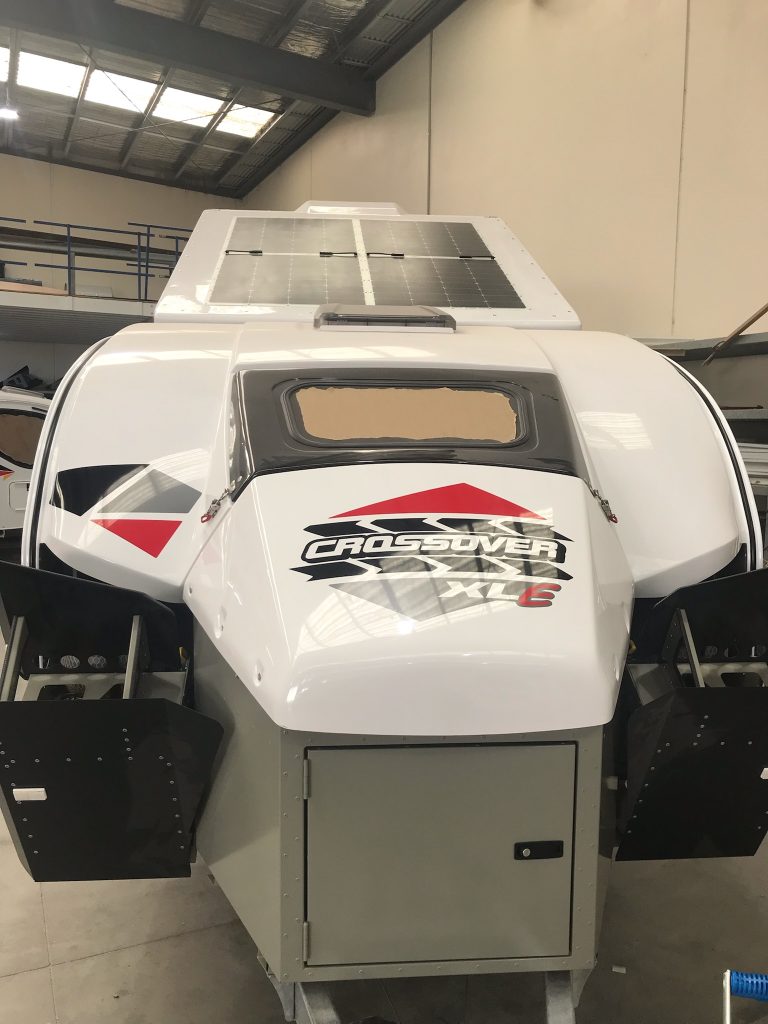
Vista RV Crossover XLE

The Doc’s new hybrid offroad caravan is nearly ready – just a shelf to be made and installed. Photos were supplied today of the van.

Electrics controlled by a REDARC TVMS with the REDARC Rogue added on for more circuits. 645W of solar panels, 400Ah of Lithium batteries and a 3000W REDARC Black Alpha inverter. It has the air suspension option as well. Tyres match the Grenadier, BF Goodridge KO2’s. Plus red go fast stickers. External kitchen with a small internal kitchen. Fridge can be used internally and externally (it is on draw).

The model name XLE signifies external fridge, verse XLI for internal fridge.

The Doc will install his JOOCLA Shower into the van.

Enjoy (The Doc is!).

Grenadier build – 20 inch lightbar details

WHAT YOU NEED

  1. STEDI Hex brackets (choose size 48 to 53mm). The STEDI hex bracket came with a Torx Security key to tighten the bolts in the hex bracket. Not sure of the size because I could not get my Torx Security bits to fit properly. The brackets come with three M6 bolts of different sizes and types. One pair was the correct length to use in my setup. The Doc also used a Nord Lock washer and a flat washer on the M6 bolt. The Nord Lock washer ensures corrugations do not loosen the bolts.
  2. Lightforce Viper 20-inch lightbar (single or double row of LEDs). The Viper comes with side mount and slide brackets.
  3. Two standard M6 nuts. Only a standard M6 nut fitted into the hex bracket slot, a M6 Nylon Lock Nut was too thick. The hex bracket only came with Nylon Lock Nuts. See also point 1 below under FITTING.
  4. Relay, tools and wiring.
  5. The Viper had a 2 pin Deutsch DT plug attached and a wiring loom. The power came from the Grenadier’s 10 amp wire ends under the bonnet. The auto electrician changed the loom and added a relay and integrated it into the car. The Doc never saw the modified loom. The relay turns on the lights when it senses current to the high beam on your spotlights (which only work when the highbeams are on).

Laws in News South Wales and WA require lightbars to be fitted to the underside of the Roo Bar hoop, not above it. You have much more flexibility if you can mount it above the Roo Boo, but at increased risk to pedestrians.

FITTING

  1. Affix with the Lightforce slide mounts that attach to the rear of the lightbar (not the ends which use brackets – the Ligthtforce comes with both options supplied) You need to reverse the way the bolts normally insert into the hex bracket. You may need to trim the bolt’s length so it does not protrude pass the width of the bracket onto the Roo Bar. Adding two washers on the M6 bolt was enough so the bolt did not protrude, in my case. The Doc used a Nord Locker washer, flat washer and a standard M6 nut.
  2. Affix the slide brackets to the bottom half of both hex brackets. The nut must go inside the hex bracket slot, not the bolt head as normal. The image below of the slide bracket shows the correct orientation for inserting the bolt into the hex bracket.
  3. Attach the slide brackets to the lightbar. Tighten bolts onto the slide brackets, after spacing them correctly (The Doc placed then 100mm in from each end of the lightbar). Just hand tighten the bolts and check the angle of the lightbar fitted under the Roo Bar, adjust position of slide brackets if needed. You do have some additional adjustment with the way you affix the hex bracket to the Roo Bar.
  4. Attach hex brackets to the Roo Bar, check it is centered correctly. Tighten all 8 bolts in the hex brackets. TIP: when tightening the Torx Security bolts on the hex bracket, The Doc would tighten a bolt two turns and then go around and do the same to all the bolts. If you tighten one bolt too much, it can result in another becoming loose. The described approach minimised that effect.
  5. Wire up the lightbar or call ORS (Sydney based) and have then do it for you.

The Single Row Viper Lightbar lines up nicely with the grille cross support to minimise disruption to the air flow.

ANOTHER OPTION: If you do not have a winch, fitting the 20-inch Viper down on the bumper would be another option. Or if you do have a winch, be very careful about drilling holes in the bumper. The end brackets could be used for mounting in this position.

Grenadier build – Lightforce Viper installed

20-inch Lighftforce Viper LED lightbar installed today. Images below, the pictures were taken after the lightbar was attached, but it was not wired up and the blue protective film was still over the lens. A detailed install guide will be posted.